> For the complete documentation index, see [llms.txt](https://docs.saros.xyz/llms.txt). Markdown versions of documentation pages are available by appending `.md` to page URLs; this page is available as [Markdown](https://docs.saros.xyz/saros-mobile-app/mobile-app/how-to-send-or-receive-nfts.md).
# How to send or receive NFTs
Saros Super App allows you to store, send, and receive non-fungible tokens (NFTs).
## How to send NFTs?
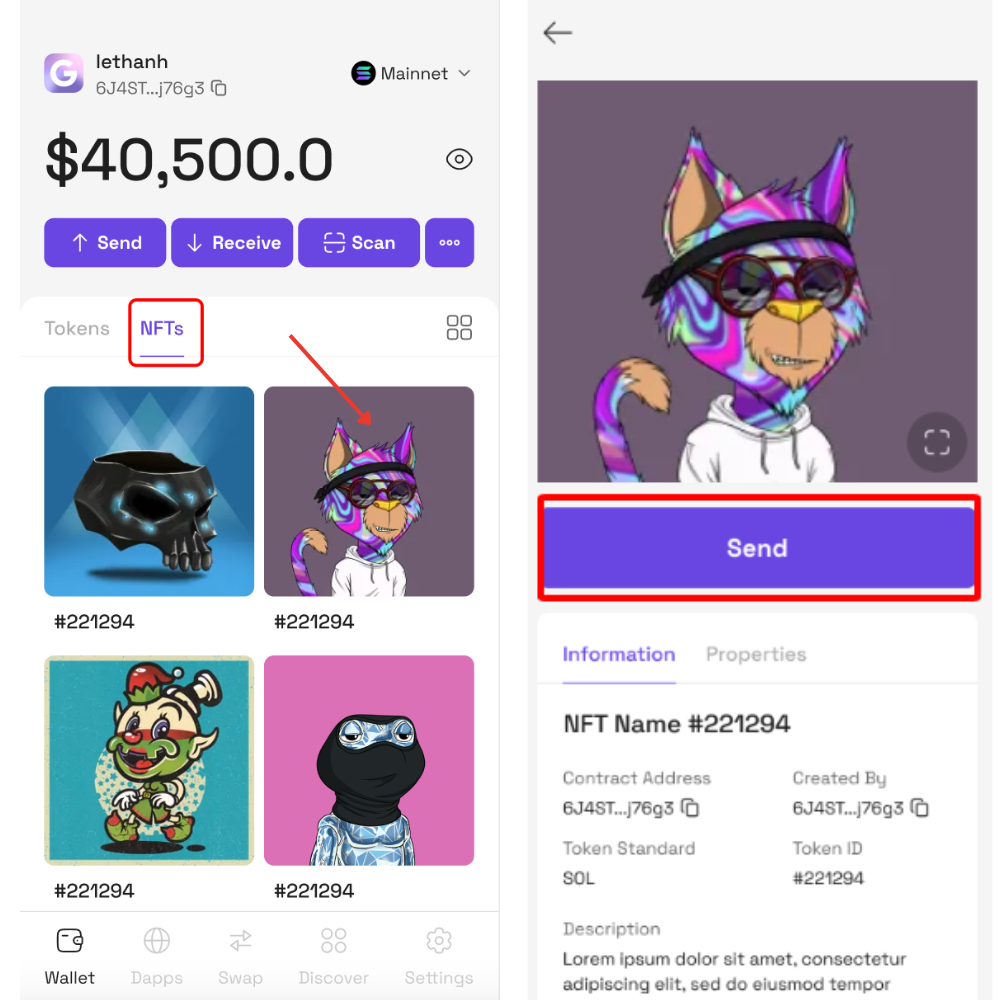
**Step 1:** On the Home screen, click **NFTs** tab.
**Step 2:** Click on an NFT to see the NFT details page, then click **Send** to make a transaction.
Before making transactions on any blockchain, you need to prepare the father token of that blockchain to pay gas fees.
{% hint style="info" %}
**Note:** Before making transactions on any blockchain, you need to prepare the father token of that blockchain to pay gas fees.
Read more about gas fee here:
{% endhint %}
**Step 3**: Input the recipient address and adjust gas fee then click **Review.**
**Step 4**: Click **Confirm** to confirm the transaction.
After the transaction has been finalized, you will be redirected to a transaction details page, and the recipient will get a message that they have received the NFT.

## How to receive NFTs?
In case there is no NFT in the wallet:
**Step 1:** On the Home screen, click **NFTs** tab.
**Step 2:** Click **+ Receive NFTs** to show **QR code** or click **Copy Address** to get the wallet address.

In case there are NFTs already in the wallet, get the Solana wallet address to receive NFTs.