> For the complete documentation index, see [llms.txt](https://docs.saros.xyz/llms.txt). Markdown versions of documentation pages are available by appending `.md` to page URLs; this page is available as [Markdown](https://docs.saros.xyz/saros-mobile-app/mobile-app/how-to-use-discover.md).
# How to use Discover
To provide new ways for users to access our features more easily and in more ways, we are providing a new tab called Discover
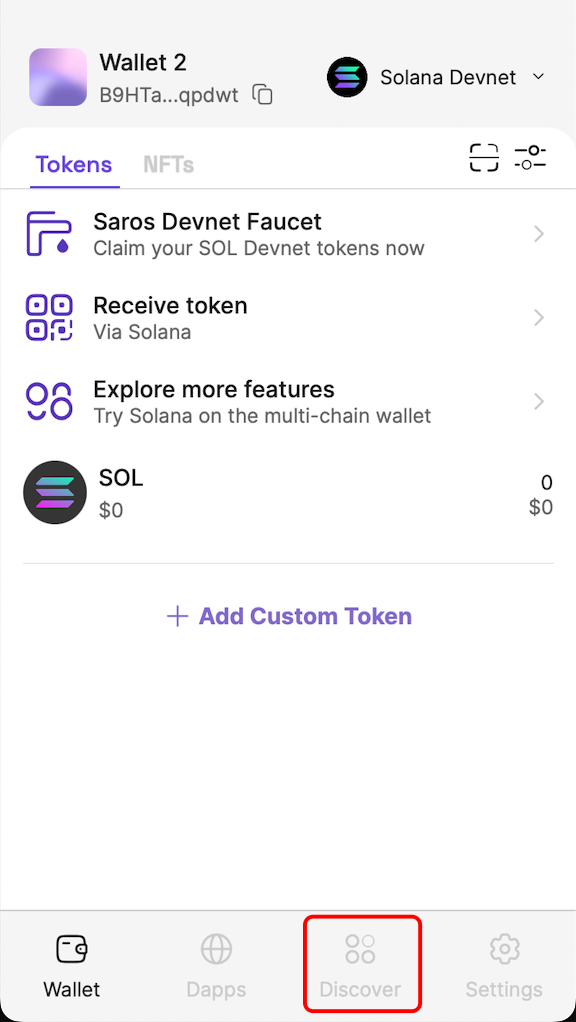
**Step 1:** Access Saros SuperApp, on the navigation bar below select the Discover tab icon
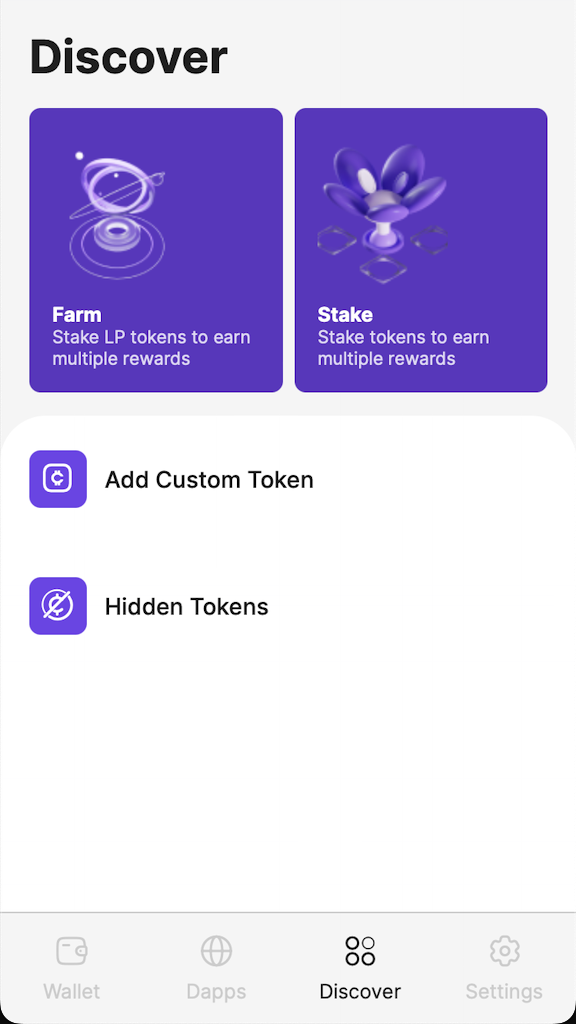
**Step 2:** Click to
* **Farm**: navigate to [Saros Farm](https://dex.saros.xyz/farm) on Dapp browser
* **Stake**: navigate to [Saros Stake](https://dex.saros.xyz/stake) on Dapp browser
* **Add Custom Token**: refer to [How to add Custom token](/saros-mobile-app/mobile-app/how-to-add-a-custom-token.md)
* **Hidden Tokens**: refer to [How to hide or show a token](/saros-mobile-app/mobile-app/how-to-manage-tokens.md#safq0fmy3nx)